
What Is an AI Prompt?
Types with Real Examples( 2026 Guide)
Your AI prompt defines the outcome—learn how to craft clear instructions for better results and improved output quality.
In 2026, AI has become a central assistant across creative, professional, and academic fields. Mastering prompt design is no longer optional—it’s essential. A structured approach to prompting helps unlock the full potential of AI systems.
Every interaction with AI begins with a prompt—a written instruction, question, or guideline that tells the system what to do. The clarity and precision of this input directly affect the quality of the output.
Understanding AI Prompts
An AI prompt is a clear directive given to an AI system to generate a response. Prompts can range from short questions to detailed instructions with structure, tone, and constraints.
Prompt engineering—the practice of designing effective prompts—has become a critical skill in content creation, business operations, research, and more.
The 2026 Strategy for Impactful AI Prompts
1. Recognize Prompt Intent
Start with a clear goal. Define what you want—content, analysis, or solutions—to guide the AI effectively.
2. Include Relevant Context
Provide background information, key details, and boundaries. Context improves accuracy and relevance.
3. Specify Constraints Clearly
Mention format, word count, tone, or limitations. This ensures precise and structured outputs.
4. Use Structured and Clear Content
Organize your prompt with clarity. Simple language and logical flow help AI respond efficiently.
5. Refine Your Prompts
Prompting is iterative. Analyze results, adjust inputs, and improve outcomes over time.
6. Apply Effective Prompt Strategies
Use techniques like role assignment, examples, or scenario-based instructions for better results.
7. Assess Response Quality
Always review outputs to ensure they align with your objective. Modify prompts if needed.
Types of AI Prompts with Real Examples
1. Instruction-Based Prompts
Clear, direct instructions help generate accurate results.
Examples:
- “Write a 300-word answer on climate change in simple language.â€
- “Create an engaging introduction for a digital marketing blog.â€
2. Question-Based Prompts
Simple questions to get quick and clear answers.
Examples:
- “What is artificial intelligence in simple words?â€
- “Why is economic growth important for a country?â€
3. Conversational Prompts
Interactive prompts that feel like talking to a tutor or assistant.
Examples:
- “Explain photosynthesis like I’m a 10-year-old.â€
- “Can you help me understand this concept step by step?â€
4. Creative Prompts
Used for storytelling, ideas, and engaging content.
Examples:
- “Write a short story about a girl chasing her dreams in Jaipur.â€
- “Create a motivational speech for students preparing for exams.â€
5. Image Generation Prompts
Detailed descriptions to create visuals using AI tools.
Examples:
- “A girl in a red saree standing in golden sunlight, cinematic style.â€
- “A modern workspace with a laptop and coffee, minimal aesthetic.â€
6. Role-Based Prompts
Assign a role to the AI for expert-level responses.
Examples:
- “Act as an economics teacher and explain demand and supply.â€
- “You are a career counselor. Suggest career options after graduation.â€
7. Data/Input-Based Prompts
Provide existing content for analysis, editing, or improvement.
Examples:
- “Correct the grammar in this paragraph and improve clarity.â€
- “Summarize this article into five key points.â€
8. Step-by-Step Prompts
Break down complex tasks into simple steps.
Examples:
- “Explain how to start a blog step by step.â€
- “Solve this problem with a detailed explanation.â€
Final Take on AI Prompts
The quality of AI output depends on how well you write your prompt. A clear and focused prompt can significantly improve results.
You don’t need to master every technique—just a few methods like structured prompts and step-by-step guidance can make a big difference.
Also, longer prompts aren’t always better. What matters is clarity, relevance, and precision. When AI gets exactly what it needs, it performs at its best.
How to write perfect AI prompts?
(Step-by- step guide for beginners)
Many people use AI tools every day but still dont feel satisfied with the results they get. In the most cases, the problem isn’t the tool itself—it is the process by which the AI prompt is written. When your command lacks clarity or direction, the end result often turns out undefined or less useful.But when you take a little time to give structured and well-defined instructions, the difference is noticeable. Concentrating on strong instruction clarity, superior input quality, and productive task execution helps provide more consistent and high-performing results.
This quick guide helps you understand how to write a result-driven AI prompt, even if you’ve never tried it before. You don't need any professional skills—just clear thinking and the right words. With better prompt writing, upgraded instruction clarity, and a stronger input structure, you can get more valuable results and refined content generation from AI tools.
What Defines a High-Quality AI Prompt?
A good prompt isn’t about making it long or overly detailed—it’s about saying the right things in the right way.Envision that you’re assigning a task to someone; you’d naturally explain what you want, who it’s for, and how it should sound. The same follows for an AI prompt. When your directions are clear and organized , with a strong input framework and clear objective, it improves prompt performance, promotes better task direction, and leads to more accurate and useful results.
The Four Key Elements of a Strong AI Prompt are :
1. Clear Instructions – Use a straightforward AI prompt with solid instruction clarity for enhanced outcomes.
2. Relevant Context – Add key details to improve context understanding and
response relevance.
3. Defined Limits – Set layout or tone to ensure proper output formatting. 4. Clear Intent – clarify your goal clearly to enhance intent recognition. Sequential Guide to Effective AI Prompt Writing
Applying the steps outlined below while crafting an AI prompt, helps creating more effective and reliable results . A systematic approach to prompt writing enhances prompt quality, reinforces response performance, and ensures more consistent and reliable output results.
Step 1: Use Clear Action Words
Start your AI prompt with a direct instruction so the AI knows exactly what to do. Words like Write, Summarize, List, Explain, Compare, Generate, or Rewrite shape the response and improve instruction clarity, task direction, and overall prompt effectiveness. Unclear introductions often lead to unclear or less useful results.
Weak Prompt
“Social media marketing†— Too broad and unclear.
Strong Prompt
“Explain social media marketing strategies for a small clothing brand.†— Clear and clarity-driven, improving instruction transparency and task direction.
Step 2: Give proper background
Adding the right details in your AI prompt helps the system give more valuable results. Mention who you are, what you’re working on, and your audience to enhance context understanding and content relevance.
Without Context
“Design a logo.†— Too imprecise, lacks direction.
With Context
“Design a minimal logo for a modern coffee shop targeting young professionals, using earthy colors.†— Clear details improve context understanding and visual
direction.
Step 3: Set Response Format
AI can respond in many formats like paragraphs, lists, or tables. If you don’t specify, it will choose on its own. Precisely defining the format in your AI prompt upgrades response formatting and ensures better output structure. It also helps you get more organized and hassle-free results.
• Present the answer as five clear bullet points
• Organize the information in a table with columns like features and benefits • Keep it brief by writing three short paragraphs with a limited word count • Share the output as a clean numbered list without adding any extra introduction Step 4: Choose the Right Tone and Audience
The tone of your content influences how it’s understood by different readers. What works for professionals may not match beginners or younger audiences. Clearly outlining tone and audience in your AI prompt enhances audience targeting, assures tone consistency, and refines overall content readability.
Example
“Explain how online shopping works in a simple, friendly tone for beginners. Eliminate technical terms, include a real-life example, and keep the explanation short and straightforward.â€
Step 5: Define clear limits and boundaries
Including clear limits to your AI prompt helps keep the response targeted and progressing. Simple things like word limits, topic boundaries, or exclusions guide the output in the correct path. Even a small limitation can improve response accuracy, enhance output quality, and assure more managed and appropriate results.
Example
“Create a 150-word article introduction about online learning. Keep the tone proficient, focus on benefits for students, and avoid using complex vocabulary or statistics.â€
Common Errors in AI Prompt Writing
Even regular AI users can fall into minor errors without realizing it. Knowing what to avoid in an AI prompt helps improve prompt quality and leads to more steady results.
1.Avoid Unclear Prompts
When your AI prompt is too broad, like asking for general information without direction, the response often turns out unfocused. Adding a clear goal, context, or specific area improves instruction clarity and leads to more relevant results.
2.Avoid Overloaded Prompts
Trying to include too many requests in a single AI prompt can lead to fragmented and less useful answers. Managing your prompt focused on one clear task refines response quality, enhances task clarity, and delivers more exact findings.
3.Ignoring the revision step
Your first AI prompt is just a starting point. If the result isn’t right, adjust it by adding details, modifying tone, or clarifying your request. This improves prompt optimization and leads to more precise outcomes.
4.Leverage Role-Based Prompts
Assigning a role in your AI prompt, like a travel guide or nutrition coach, gives the AI clear outlook and target. This advances response relevance, enhances content accuracy, and delivers more thoughtful and professional results.
The Ultimate AI Prompt Formula
Integrate everything using this simple formula, and you can create an effective AI prompt for any task with ease.
[Action] + [Context] + [Audience] + [Format] + [Constraints] Example:
“Write [action] an accessible tutorial to healthy meal prep [context] for busy professionals [audience] as 5 actionable steps [format] under 300 words [constraint].â€
Pre-Submission AI Prompt Checklist Go through this checklist before sending any AI prompt to affirm you’ve featured all
the key aspects and set yourself up for the outstanding ourcomes : 1. Did I start the prompt with a clear, direct instruction?
2. Have I provided enough background for the AI to understand my situation? 3. Did I outline the format I want for the response?
4. Have I clearly specified the tone and target audience?
5. Did I include at least one parameter, such as word count, scope, or style? 6. Is this targeted on a single task rather than integrating multiple questions? Wrapping Up: AI Prompt Best Practices
Specializing AI prompt writing is a skill anyone can learn, and it conveys results right away. You don’t need to be a developer or AI expert—what concerns is being clear, giving the right perspective, and indicating exactly what you want. This approach boosts output accuracy, increases content relevance, and ensures you get more meaningful and actionable AI responses.
Begin by following the five-step structure and applying the formula to your AI prompt. Keep in mind that the first reaction is just a draft, not the final output. Optimizing and advancing your prompt is where you access better results, enrich response accuracy, and accomplish more impactful AI outputs.
In 2026, the people who truly outperforms with AI aren’t essentially using the premium tools—they’re the ones who know how to ask the right questions and instruct the AI strategically.
ghhgfhjg

hgfh dfg
Vero voluptas id es

Lorem ipsum dolor sit amet consectetur adipisicing elit. Optio, pariatur. Sed delectus minima officia illo. Ullam, tempore. Nihil, ea amet inventore similique veniam assumenda repellendus quas. Animi nostrum eligendi doloremque deserunt suscipit accusamus doloribus nemo voluptatibus eius quae porro beatae cumque iste unde excepturi repellendus, sed culpa odit? Dolor, necessitatibus.
Lorem ipsum dolor sit amet consectetur adipisicing elit. Optio, pariatur. Sed delectus minima officia illo. Ullam, tempore. Nihil, ea amet inventore similique veniam assumenda repellendus quas. Animi nostrum eligendi doloremque deserunt suscipit accusamus doloribus nemo voluptatibus eius quae porro beatae cumque iste unde excepturi repellendus, sed culpa odit? Dolor, necessitatibus.
Lorem ipsum dolor sit amet consectetur adipisicing elit. Optio, pariatur. Sed delectus minima officia illo. Ullam, tempore. Nihil, ea amet inventore similique veniam assumenda repellendus quas. Animi nostrum eligendi doloremque deserunt suscipit accusamus doloribus nemo voluptatibus eius quae porro beatae cumque iste unde excepturi repellendus, sed culpa odit? Dolor, necessitatibus.
gfdgf

g
sdfdsfgd

fdsfvds
htyhgtfh ytrfg

h
General Tips for Designing Prompts
Start Simple
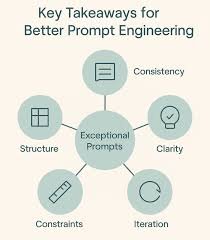
As you get started with designing prompts, you should keep in mind that it is really an iterative process that requires a lot of experimentation to get optimal results. Using a simple playground from OpenAI or Cohere is a good starting point.
You can start with simple prompts and keep adding more elements and context as you aim for better results. Iterating your prompt along the way is vital for this reason. As you read the guide, you will see many examples where specificity, simplicity, and conciseness will often give you better results.
When you have a big task that involves many different subtasks, you can try to break down the task into simpler subtasks and keep building up as you get better results. This avoids adding too much complexity to the prompt design process at the beginning.
The Instruction
You can design effective prompts for various simple tasks by using commands to instruct the model what you want to achieve, such as "Write", "Classify", "Summarize", "Translate", "Order", etc.
Keep in mind that you also need to experiment a lot to see what works best. Try different instructions with different keywords, contexts, and data and see what works best for your particular use case and task. Usually, the more specific and relevant the context is to the task you are trying to perform, the better. We will touch on the importance of sampling and adding more context in the upcoming guides.
Others recommend that you place instructions at the beginning of the prompt. Another recommendation is to use some clear separator like "###" to separate the instruction and context.